Plugins & Scripts
Liquid Glass for After Effects
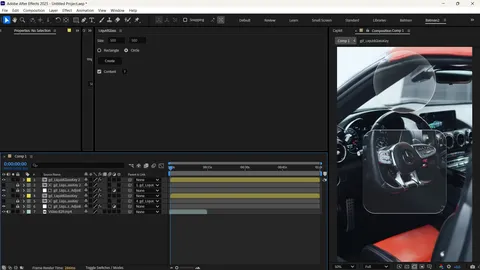
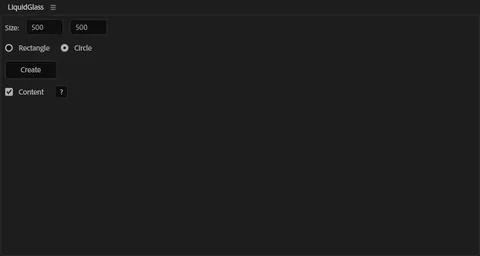
Create beautiful liquid-glass style shapes and UI elements inside Adobe After Effects with a single click. Perfect for modern UI animations, motion graphics, glassmorphism effects, and premium interface design.
Table of Contents
Features
One-Click Generator
Instantly create complex liquid-glass shapes with a single click. No need to build complex layer hierarchies or apply multiple effects manually.
Modern Glassmorphism
Achieve the highly sought-after glassmorphism aesthetic perfectly tuned for premium UI animations and motion graphics.
Fully Editable
Every generated shape remains fully customizable. Tweak gradients, refraction, blur, and lighting to match your project's exact art direction.
High Quality & Fast Workflow
Designed to output professional-grade results while maintaining optimal playback speed in After Effects. Supercharge your workflow without compromising on quality.
What's Included
Liquid Glass Plugin ZIP
Glassmorphism Presets
Installation Guide
1
Download the ZIP File
Click the download button above to get the Liquid Glass plugin from Google Drive.
2
Extract Files
Unzip the downloaded archive on your computer.
3
Install Plugin
Run the provided installer or copy the plugin file into your After Effects "Plug-ins" folder.
4
Restart After Effects
Launch After Effects. Liquid Glass will now be available in your Effects menu.
Compatibility
 After Effects 2022-2025
 Windows
10K+
Instant Downloads
Weekly
Updated Assets
100%
Virus Checked
Manual
Verification Process
Why Download From PRADUMNA_FX
Virus Checked
Every file is scanned for malware before being uploaded.
Fast Download
Hosted on global edge networks for maximum speed.
Weekly Updates
We continuously update extensions to ensure compatibility.
Commercial Use
Use tools safely across personal and client projects.
The Ultimate Liquid Glass Plugin for After Effects
In the rapidly evolving world of motion graphics and UI design, achieving the perfect glassmorphism aesthetic can be a time-consuming challenge. The Liquid Glass plugin for After Effects revolutionizes this workflow by providing a one click liquid glass generator that instantly transforms ordinary layers into stunning, refractive 3D glass elements.
Whether you are designing premium Apple Liquid Glass inspired interfaces, crafting high-end visual effects, or compositing complex scenes, this glass plugin after effects tool eliminates the need for manual masking, blurring, and tedious layer duplication.
What is Liquid Glass in After Effects?
Liquid Glass is a powerful After Effects plugin (often utilized alongside Saber and Deep Glow) designed to simulate realistic, dynamic glass surfaces. Unlike traditional glassmorphism which relies heavily on static background blur and semi-transparent fills, Liquid Glass introduces fluid dynamics, real-time light refraction, and edge distortion.
By leveraging advanced rendering algorithms, this liquid plugin after effects allows motion designers to create animations that look incredibly organic. The resulting 3D liquid glass after effects visuals are perfectly suited for modern app promo videos, UI/UX presentations, and cinematic title sequences.
Core Features of the Liquid Glass Plugin
This liquid glass after effects preset and plugin combo comes packed with features that supercharge your VFX and compositing pipeline:
- One-Click Generation: Convert any shape layer, text, or pre-comp into a refractive glass object instantly.
- Dynamic Refraction: Accurately bends the background pixels behind your layer, mimicking real-world physics and optics.
- Fluid Edge Distortion: Creates a smooth, bevelled liquid edge that reacts beautifully to animated lighting setups.
- Customizable Blurs: Fine-tune the internal frost and blur intensity to achieve everything from frosted privacy glass to clear crystal.
- Seamless Integration: Works effortlessly alongside industry-standard tools like Element 3D and Trapcode.
How Does Liquid Glass Work?
When you apply the Liquid Glass after effects script to a layer, it intelligently analyzes the alpha channel of your target object. It then creates an intricate web of adjustment layers and effects (including customized displacement maps, fast box blurs, and chromatic aberration) confined perfectly within the boundaries of your shape.
This automated process replaces what would normally require a 20-step manual tutorial on how to make liquid glass after effects. Furthermore, all parameters are exposed in a clean, user-friendly Effects Control panel, allowing you to tweak the "liquidness" and "glassiness" non-destructively.
Who Should Use the Liquid Glass Plugin?
This tool is indispensable for:
- Motion Graphics Artists: Speed up the creation of trendy, premium lower thirds and broadcast graphics. Combine with Flow for buttery-smooth animations.
- UI/UX Animators: Bring Figma designs to life by recreating authentic Apple liquid glass styles within the After Effects timeline.
- Visual Effects Artists: Easily generate organic, liquid-like forcefields or sci-fi interfaces that interact with live-action footage.
Comparison: Liquid Glass Plugin vs. Manual Effects
Many beginners search for a liquid glass after effects tutorial to learn how to build these effects manually using native tools like CC Glass, Displacement Map, and Gaussian Blur. While entirely possible, the manual approach has significant drawbacks:
Manual Workflow:
- Requires multiple pre-comps and complex track matte setups.
- Updating the underlying shape breaks the masking, forcing you to rebuild the effect.
- Lacks true chromatic edge refraction without heavy third-party color manipulation.
Liquid Glass Plugin Workflow:
- Applied in literally one click.
- Fully parametric. If you change the underlying vector path, the glass effect updates instantly.
- Built-in chromatic aberration and edge highlights.
- Pairs excellently with Motion Tools for fast pivot adjustments and layer management.
Achieving the Apple Liquid Glass Aesthetic
The "Apple Aesthetic" is defined by its pristine, hyper-realistic, yet impossibly smooth glass and liquid elements. To replicate this high-end look using the Liquid Glass after effects template:
- Start with a high-contrast, colorful gradient background.
- Create a rounded rectangle or organic blob shape using the pen tool.
- Apply the Liquid Glass effect.
- Increase the 'Refraction Index' to simulate thick glass.
- Add a subtle white inner shadow to emulate edge lighting.
- Animate the shape's path over time, and let the plugin dynamically handle the distortion.
For more detailed techniques, read our deep dive on How to Create Liquid Glass in After Effects.
Professional Workflow & Best Practices
To maximize the performance and visual fidelity of the Liquid Glass plugin after effects free tier:
- Resolution Independence: Always work with vector layers or high-resolution pre-comps. The glass distortion relies on clean alpha edges to calculate the bevel and refraction.
- Layer Stacking: For extreme 3D depth, stack multiple Liquid Glass layers with varying blur intensities. This fakes physical thickness.
- Color Correction: Drop Magic Bullet Looks on an adjustment layer above your glass elements to unify the color palette and enhance the specular highlights.
- Motion Blur: Enable native After Effects motion blur. If you are applying liquid glass to live-action footage, consider using RSMB for highly accurate optical motion blur.
Troubleshooting & Performance
While the liquid glass plugin after effects download is highly optimized, complex refraction algorithms can be demanding on your GPU. If you experience timeline lag:
- Lower your composition preview resolution to "Half" or "Third".
- Temporarily disable the "Chromatic Aberration" toggle within the plugin settings while animating.
- Ensure your GPU drivers are up to date, and that After Effects is set to use CUDA/Metal acceleration in the Project Settings.
For further assistance with installation, check out our guide on How to Install AE Plugins.
Expand Your Toolkit
Liquid Glass is just one piece of the puzzle. To truly elevate your motion graphics, consider integrating these top motion graphics plugins into your workflow:
- Optical Flares for realistic lens reflections off your glass surfaces.
- Signal for adding analog VHS distortion to your futuristic UI designs.
- Twixtor for incredibly smooth slow-motion background plates.
- Easy Workflow to manage your complex layers and compositions efficiently.
Are you looking to shatter your glass designs? While Liquid Glass specializes in fluid and intact surfaces, you can easily combine it with the Shatter effect in After Effects or Element 3D to create stunning explosive sequences.
Explore our vast Editing Assets library, leverage our AI Tools for faster ideation, and read more in the Blog to master the art of visual storytelling.
Deep Dive: The Evolution of Glassmorphism in UI Design
Glassmorphism has been the dominant trend in digital design for several years, popularized largely by the Apple design ecosystem across macOS Big Sur, iOS, and visionOS. The signature look—characterized by heavily blurred backgrounds, subtle borders, and vivid colors shining through—has set a new standard for premium interface design.
However, bringing this static UI concept into the realm of After Effects animation introduces a slew of technical hurdles. In static tools like Figma or Adobe XD, a background blur is computationally inexpensive. In Adobe After Effects, simulating realistic 3D liquid glass requires computing millions of pixels of refraction per frame.
Before the introduction of dedicated glass plugin after effects solutions, animators relied on a combination of adjustment layers, the native Fast Box Blur, and the Displacement Map effect. This manual process is notoriously inflexible. If you wanted to animate the shape of your glass panel, the track mattes and displacement maps often broke or required tedious keyframing.
The Liquid Glass After Effects template and plugin changes the paradigm entirely. By consolidating the mathematical complexities of Snell's Law (refraction) and Fresnel reflection into a single, GPU-accelerated effect, it empowers designers to create one click glass animation that renders in a fraction of the time.
Liquid Glass vs. Standard Glassmorphism
While the terms are often used interchangeably, there is a distinct difference between standard glassmorphism and the liquid glass aesthetic. To explore this in complete detail, check out our comparative article on Liquid Glass vs Glassmorphism.
Standard glassmorphism is flat. It relies on 2D planes hovering over a background. Liquid glass, on the other hand, implies volume and viscosity. A liquid glass after effects plugin doesn't just blur the background; it bends it around the edges of the shape, creating a bevelled, magnifying-glass effect that implies physical depth and liquid density. This is crucial for creating futuristic, tactile UI components that feel like they belong in spatial computing environments.
Integrating Liquid Glass with 3D Ecosystems
For advanced users, liquid glass animation after effects techniques don't have to be limited to 2.5D space. When combined with the Element plugin After Effects, you can apply the liquid glass aesthetic to true 3D geometry.
To achieve this:
- Create your base 3D model using Element 3D and assign a basic refractive material.
- Render a pass of your 3D model's alpha and depth channels.
- Apply the Liquid Glass After Effects script to a 2D adjustment layer, using the Element 3D alpha pass as your mask.
- This hybrid approach allows you to inject the highly stylized, chromatic edge distortion of the Liquid Glass plugin onto complex 3D meshes that Element 3D normally struggles to render with caustics.
Advanced Techniques: Combining with Particles and Glows
The true power of any After Effects plugin lies in how it interacts with the rest of your toolset. Liquid glass elements often look their best when refracting bright, dynamic light sources.
Trapcode Particular Integration:
By placing a layer of Trapcode particles behind your Liquid Glass layer, you can create mesmerizing abstract visuals. As the particles pass behind the refractive shape, the liquid plugin after effects distorts them, creating a microscopic or aquatic feel. This technique is widely used in tech commercials and medical animations.
Deep Glow for Volumetric Lighting:
Because the plugin introduces chromatic aberration (the separation of RGB channels at the edges), adding a high-quality exponential glow like Deep Glow on top of the final composite yields breathtaking results. The glow will catch the hyper-bright specular highlights generated by the glass, scattering light across your composition in a physically accurate manner.
Optimizing Your Project for Liquid Glass Rendering
Even with GPU acceleration, computing 3D liquid glass after effects is heavy. For large-scale projects, we recommend the following rendering strategies:
- Pre-compose Heavy Backgrounds: If your glass is refracting a background that consists of dozens of layers, pre-compose that background and render it out as a high-bitrate proxy. The plugin will calculate refraction much faster when analyzing a single flat video layer.
- Use 16-bpc or 32-bpc: To avoid banding in the smooth gradients and soft blurs of the glass, switch your After Effects project working space to at least 16 bits per channel.
- Smart Cache Management: Regularly purge your memory and disk cache (Edit > Purge > All Memory & Disk Cache) when tweaking the refraction index, as AE can sometimes hold onto old cached frames of the distortion map.
The Future of UI Animation
As spatial computing platforms like Apple Vision Pro become more prevalent, the demand for apple liquid glass plugin after effects workflows will only increase. Clients are no longer satisfied with flat, 2D motion graphics. They expect their digital interfaces to possess materiality, weight, and interactive physics.
Mastering tools like the Liquid Glass plugin After Effects free download ensures you stay ahead of the curve. By automating the tedious aspects of compositing, you free up more time to focus on animation timing, color theory, and creative direction.
If you're eager to learn more about the best tools to complement this workflow, read our guide on the Best Glass Plugins for After Effects or explore our curated list of the Best Free After Effects Plugins available today.
Liquid Glass Plugin vs Traditional Glass Effects
When creating liquid glass animation after effects, motion designers often debate between using a dedicated glass plugin after effects or relying on native workflows. Here is a definitive breakdown of why professionals prefer one-click workflows to achieve the apple liquid glass after effects aesthetic.
| Feature | Liquid Glass Plugin | Manual Glass Animation |
|---|---|---|
| Setup Time | Instant (1 Click) | 15-20 Minutes |
| Refraction Logic | Volumetric & Dynamic | Flat (Fast Box Blur) |
| Chromatic Aberration | Built-in Edge Dispersion | Requires heavy channel shifting |
| Shape Updates | Updates Automatically | Breaks mask hierarchies |
| Apple Liquid Glass Support | Perfect replication | Struggles with physical depth |
Frequently Asked Questions
The Liquid Glass Plugin is an advanced Adobe After Effects tool designed to instantly create 3D, refractive glass surfaces, eliminating the need for complex manual layer masking.
It utilizes specialized displacement algorithms to sample the alpha channel of your layer, mathematically refracting the background pixels to simulate physical glass depth and chromatic aberration.
Yes, this specific version of the Liquid Glass plugin is completely free to download and use for both personal and commercial motion design projects.
Absolutely. It is designed as a 'one-click' workflow. You do not need to understand complex compositing mathematics to achieve the glassmorphism aesthetic.
Yes, the plugin is fully supported and optimized for Windows operating systems.
While this specific download is optimized for Windows environments, many Adobe CEP extensions and .ffx presets can be manually ported to macOS folders.
It officially supports Adobe After Effects CC 2022, 2023, 2024, and the latest 2025 releases.
Yes, you can use the Liquid Glass effects in commercial broadcast, YouTube videos, and client UI/UX presentations without royalty fees.
100%. All PRADUMNA_FX downloads pass through rigorous manual verification and virus scanning before being securely hosted on Google Drive.
Extract the downloaded ZIP file and copy the plugin components into your Adobe After Effects 'Plug-ins' or 'Presets' folder, then restart the software.
Apple Liquid Glass refers to the hyper-realistic, colorful, and highly refractive UI materials popularized in visionOS and macOS. This plugin replicates that exact aesthetic.
Glassmorphism is a 2D design trend relying on static background blurs. Liquid Glass introduces 3D volume, fluid refraction, and optical edge distortion.
Calculating real-time refraction is intensive. However, this plugin is GPU-accelerated. For heavy projects, simply lower your playback resolution to 'Half'.
Yes, simply navigate back to your 'Plug-ins' folder and delete the Liquid Glass files to completely remove it from your system.
No, Liquid Glass operates entirely independently in 2.5D space. However, it can be combined with Element 3D renders for incredible hybrid visuals.
Yes, it perfectly conforms to native vector shape layers, text layers, and complex pre-compositions.
Yes. By animating the underlying vector path or applying native distortion effects underneath the Liquid Glass layer, the refraction updates dynamically.
Banding in smooth gradients and blurs can be fixed by switching your After Effects Project Settings from 8-bit to a 16-bit or 32-bit color workspace.
Yes, the download ZIP includes starter presets and templates to instantly apply standard, frosted, and chromatic glass variations.
Liquid Glass relies on an active background layer to distort. Ensure your target layer is placed above the background footage or composition you want to refract.